


A pragmatic guide to using note-takers under the Privacy Act
From 10 December 2026, organisations covered by Australia's Privacy Act must say in their privacy policy when they use computer programs, including AI, to make or substantially help make decisions that could significantly affect people. These are known as the automated decision-making (ADM) rules. Most commentary on the change talks about recruitment software and credit scoring. Almost none of it mentions the AI meeting summary.
It should, because an AI note-taker turns every recorded meeting into a permanent written record, and those records increasingly feed decisions about people, such as a client complaint, a hardship request or a lending conversation. Internal meetings can count too, for example where notes shape a decision about a job applicant, though a private employer's handling of its own staff records is generally exempt (see below). Whoever the summary is about, if it shapes a decision about them, your organisation may need to disclose that.
This guide covers what the new rule says, how to tell whether your meeting summaries could be caught by it, the consent questions that sit alongside it and six things to do now. I use these tools every day, but I'm not a lawyer, so treat this as a practical starting point and take your specific questions to a privacy adviser.
What the automated decision-making rules require
The automated decision-making rules add three new Australian Privacy Principles, APPs 1.7 to 1.9, which came in through the Privacy and Other Legislation Amendment Act 2024 and apply from 10 December 2026. The Office of the Australian Information Commissioner (OAIC) published its final guidance on them in September 2026.
The rule applies when three things are all true:
- Your organisation has arranged for a computer program to make a decision about a person, or to do something substantially and directly related to making that decision.
- The decision could reasonably be expected to significantly affect that person's rights or interests.
- Personal information about the person is used when the program runs.
When all three apply, your privacy policy has to describe the kinds of personal information used and the kinds of decisions involved. The rule is only about transparency. It doesn't ban anything or give people a right to challenge the decision or ask for a human review.
Three details catch people out:
- "Computer program" covers more than AI. It includes generative AI, but also rules-based software, scoring tools and even spreadsheets. What matters is whether the program's output shapes a decision about a person. For example, using AI to tidy up meeting notes isn't caught, but relying on an AI summary to decide whether a customer's complaint is upheld might be.
- Saying no is a decision too. The rule covers decisions that refuse something or rule someone out, as well as decisions that approve something. For example, a summary used to decline a customer's hardship request counts just as much as one used to grant it.
- You can't hand the obligation to your vendor. If the program belongs to Microsoft, Google or a note-taker start-up, the disclosure still belongs in your privacy policy, because your organisation chose to use it in the decision. For example, if your team relies on Copilot meeting recaps when assessing claims, your privacy policy has to say so, and Microsoft's won't cover it.
A person signing off doesn't take you out of scope
The OAIC's own example is a company that has AI write a short profile of each employee before their performance and pay review. The manager reads the profile, makes the call and can disagree with it.
You'd think that keeps the AI out of the decision. The OAIC says it doesn't, because managers lean on the profile when they write up the reasons for each outcome. If the AI shapes the decision, the organisation has to disclose it. The OAIC says that can change with extensive human oversight, such as staff questioning the AI's output, checking the underlying data, seeking other evidence and recording why they departed from it.
Who it applies to
The rule applies to organisations covered by the Privacy Act. For most private businesses that means annual turnover above $3 million, though some smaller businesses are covered too, such as health service providers. If you're not sure where you sit, confirm that first. For a broader view of how the Privacy Act shapes AI use, see our guide to what responsible AI means for Australian businesses in practice.
There's also an exemption for employee records. A private-sector employer's handling of its own staff's records, where it relates directly to a current or former employment relationship, is generally exempt from the Australian Privacy Principles. That may take some decisions about current employees, such as performance ratings or bonuses, outside the rule. It doesn't cover job applicants, customers or clients, and it's unlikely to cover HR, recruitment or training providers handling another organisation's staff records. The OAIC's own fact sheet uses staff pay as an example of an in-scope decision without addressing the exemption, so how the two fit together is unsettled. Check with your adviser.
Automated decisions beyond meeting summaries
Meeting summaries are the case most organisations miss, but the ADM rules cover any computer program that plays a part in a significant decision about a person. While you're reviewing note-takers, check these too:
- Recruitment tools that screen, rank or reject job applicants
- Credit, lending and hardship assessments
- Eligibility, pricing or approval rules in customer systems
- Claims triage and fraud flags
- Customer service tools that decide refunds or complaints
- Spreadsheets or scoring models used to rank people
For each one, your privacy policy needs to describe the kinds of personal information the program uses and the kinds of decisions it informs. For example, if a scoring tool ranks loan applicants and staff only review the top half, the tool is part of the decision, even though a person approves each loan. Mapping these across a business is a large part of our AI governance consulting work.
Does your AI meeting summary count?
Run each kind of meeting summary your organisation produces through the four questions below. Most will drop out early, and the ones that reach the bottom are worth raising with your privacy adviser.
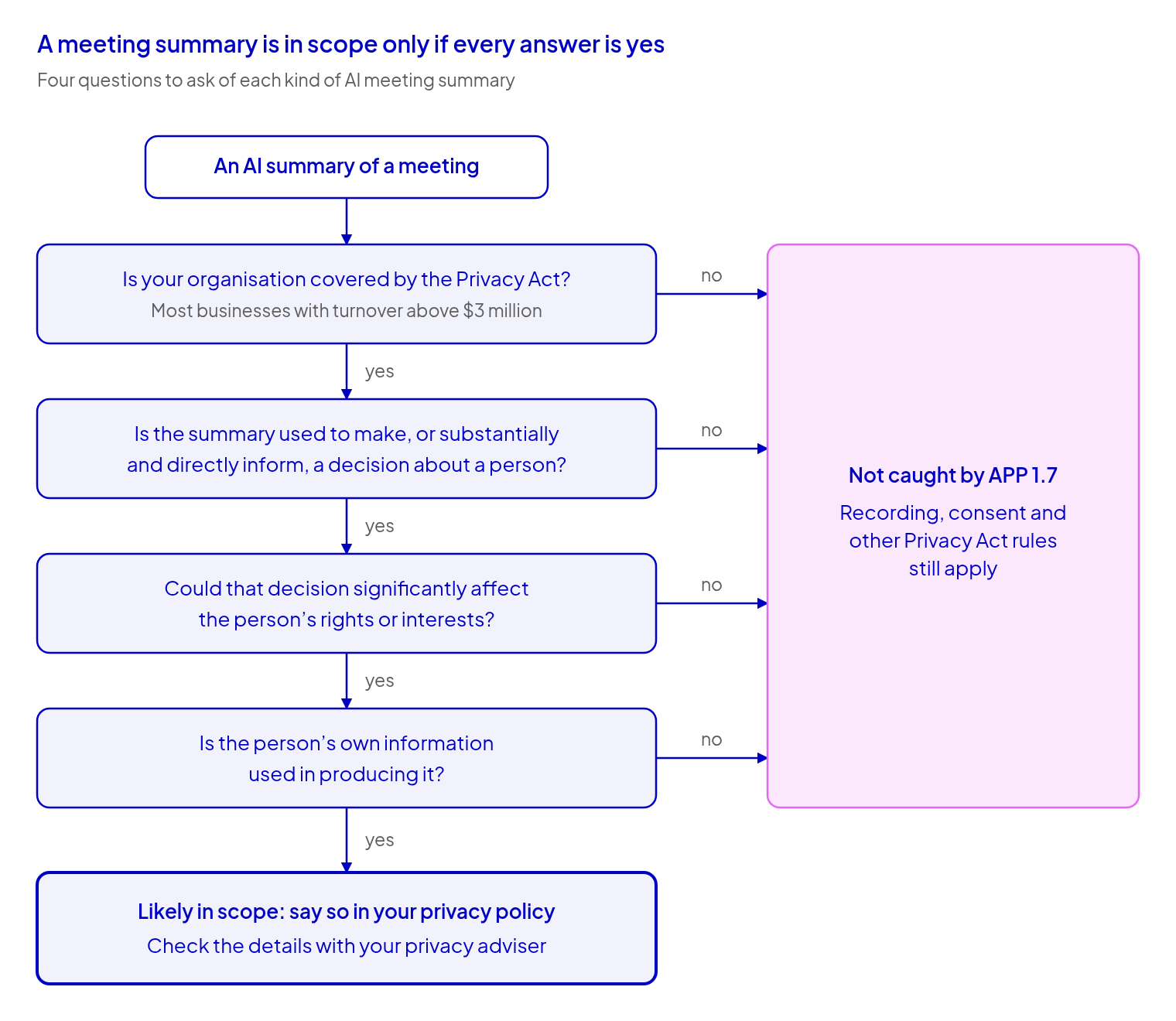
A manager signing off on the decision doesn't change the answer to the second question, as the OAIC's staff profile example shows. A summary of a design meeting drops out at that question. A summary used to decide whether a customer gets a refund or a payment plan usually doesn't.
Why note-takers are worth using, and what they keep along the way
In my opinion, AI note-takers are worth the effort. A meeting transcript is the best raw material most organisations have for the documents nobody enjoys writing: specs, file notes, proposals, minutes and reports.
At ExpandIQ, our software design sessions are recorded, and an AI agent drafts the user stories and definitions of done from the transcript for us to review and approve. That used to take someone several hours, sometimes a full day. I've also written a client proposal on the train using my phone AI apps and the transcript of our scoping meeting, and it was finished in under an hour. The same document used to take a day or two.
The catch is that a transcript has no idea why you recorded the meeting. You wanted a spec or a proposal, and you also captured every aside, half-formed opinion and comment about someone who wasn't in the room. The document you wanted uses a fraction of it. The rest sits in a system somewhere, searchable, for as long as the default retention setting allows.
What gets captured by accident
We once recorded a call where everyone had agreed to the recording. When the meeting ended, one participant didn't hang up and went on to make a personal phone call, and the recording ran for another half hour. We ended up holding a transcript of her side of a private conversation, full of names and personal details, that had nothing to do with us. We deleted it and told her what had happened.
Nobody did anything wrong. One person just forgot to hang up properly, and it shows that consent at the start of a meeting doesn't control what gets said, who joins or when the recording stops. Some tools will even join meetings on their own once they have calendar access, sometimes meetings their owner isn't attending.
What gets recorded wrongly
When transcription software misses a word, it rarely flags the gap. Instead, it fills in the gap with a word that best fits the sentence. People have reported summaries that put a payments rollout in Russia when the meeting was about France, and "8 to 10" recorded as "18". The New York Times gave the example of a transcript turning "does matter" into "doesn't matter".
A transcription error can be checked if the audio was kept, but some popular tools discard the audio once the transcript is made. A summary error is harder still, because it reads as a fluent, believable account. If that summary then feeds a decision about a person, the error goes with it.
Most organisations didn't decide to adopt note-takers. People switched them on one by one, which is the same pattern we see when AI tools are bought before anyone decides what they're for.
Not all note-takers work the same way
The obligations are the same whichever tool you use. The Privacy Act, the recording laws and the automated decision-making rules all turn on what you capture and how you use it. What changes from tool to tool is how visible the recording is and who controls it, and that changes how much work it takes to meet those obligations.
Here's how the main types compare at the time of writing (November 2026). Vendors change these settings often, so check your own tools.
| Type | Examples | How others know it's running | Who controls it | Watch out for |
|---|---|---|---|---|
| Built into the meeting platform | Microsoft Teams transcription and Copilot, Zoom AI Companion, Google Meet "Take notes for me" | The platform shows every participant a notice or icon when it starts | Admins set the rules for the organisation. The host starts it, or it can be set to start automatically | Teams admins can require each participant to actively agree before they're recorded, and Google Workspace admins can require consent too. The data stays in the account you already have |
| A bot that joins as a participant | Otter, Fireflies, Read.ai | It appears in the participant list with a name like "Notetaker" | Each user. Many are set to join automatically from the user's calendar, including meetings the user doesn't attend | The host can remove it from the participant list. Some email a recap to everyone on the invite. The data sits with the vendor |
| Bot-free, capturing from your device | Granola, Fireflies' Chrome extension | Nothing appears, unless the user turns on a chat notice | Each user. Granola offers an organisation-wide notice only on its Enterprise plan | Granola keeps the transcript but not the audio. It now faces a US class action alleging participants weren't told |
| In-person recorders and phone apps | Plaud and similar pocket recorders, phone voice memo apps | Nothing, unless someone says so | Each person | These work in a room with no video call, so none of the platform notices or admin controls apply |
The further down the table, the more the burden falls on the individual. If your organisation already pays for Microsoft 365, Zoom or Google Workspace, the built-in tool is usually the easiest to govern, because it announces itself and IT can set the rules centrally. Bot-free tools and phone recorders rely entirely on the person using them to speak up.
Consent and notification: why a banner may not be enough
The automated decision-making rules are about your privacy policy. Separately, two other sets of rules already apply the moment someone presses record.
The Privacy Act
The OAIC treats meeting recordings and AI transcripts as personal information. Its guidance on commercially available AI products specifically covers note-taking and transcription tools, and includes a worked example about AI-generated meeting minutes.
That guidance says consent can't be implied just because someone was told about the collection. Most note-takers show a banner when recording starts. The banner tells people that recording and transcription are under way, but it doesn't ask for their agreement. It also doesn't meet the automated decision-making rules, which require the role AI plays in significant decisions about people to be described in your privacy policy.
The same guidance says that collecting sensitive information about a person with AI, such as health details, will usually need their consent. Meetings drift, so a routine call can become sensitive halfway through. And because most note-taker vendors store data overseas, the rules on sending personal information offshore (APP 8) apply too.
State and territory recording laws
Recording laws differ by state and territory, and the usual "one-party versus all-party consent" summary is too simple. Everywhere in Australia, recording a conversation is generally lawful when everyone in it agrees. The states differ on what you can do without that agreement:
- New South Wales, Tasmania and the ACT: You generally need everyone's consent to record a private conversation, even one you're taking part in. The exceptions are narrow, such as recording to protect your lawful interests, or a recording that isn't made to be shared with anyone outside the conversation.
- Western Australia and South Australia: The same requirement applies, so you generally need everyone's consent, with limited exceptions.
- Queensland, the Northern Territory and Victoria: If you're taking part in the conversation, you can generally record it without the others' consent. Sharing the recording with anyone else usually needs their consent or an exception.
This summary follows law firm Hamilton Locke's state-by-state guide to recording private conversations, which cites the relevant section of each state's legislation.
AIPex points out that an AI note-taker's whole job is to send the transcript somewhere, such as attendees' inboxes or the vendor's servers. That may remove the exception people rely on for ordinary note-taking. No court has ruled on it, but it's a fair reason to ask everyone. For the detail, AIPex's state-by-state guide and Astris Law's Queensland guide are the best I've found.
When people in the meeting are in different states, the simplest approach is to meet the strictest rule: say what you're recording and why, and get everyone's agreement.
If you're the one being recorded
The rules cut both ways. If your manager or a client wants to record a meeting with you, you're entitled to ask what's captured, where it goes and how long it's kept. Be careful about recording others secretly yourself: the Fair Work Commission has upheld dismissals over an employee's covert recording of a performance meeting.
Since June 2025 there has also been a statutory right to sue for serious invasions of privacy. It applies whether or not an organisation is covered by the Privacy Act.
When it's someone else's note-taker
More and more often, the recorder in your meeting belongs to a client or supplier. Their bot or app captures what you and your team say, and the transcript sits in their systems under their settings.
You can ask the same questions, and ask for it to be paused for a sensitive part of the conversation. If you're hosting, you can usually decline to admit a bot or remove it from the participant list. Agree a standard position for your team, such as allowing external note-takers in project meetings but not in commercial negotiations.
When someone says no
Give people a real alternative, such as handwritten notes or a summary written afterwards that they can check. Unless the recording is essential, don't make agreeing to it a condition of attending.
Captions and transcripts help people who are deaf or hard of hearing, or working in a second language. If someone relies on them, talk through what would work for everyone.
What US courts and lawsuits have started to test
The legal fights over AI records are happening in the US first. As far as I can find, none of these questions has been tested in an Australian court at the time of writing, so read them as early signals rather than settled law here.
- Discoverability: Corporate lawyers interviewed by the New York Times in May described removing AI note-takers from meetings before they start. Their concern is that transcripts keep the offhand comments and jokes that never make it into minutes, and in a lawsuit those transcripts can be requested like any other document.
- Privilege: In February 2026, Judge Jed Rakoff in New York ruled that a defendant's conversations with a consumer AI app about his legal situation weren't privileged, pointing to the app's privacy policy. The same month, a Detroit judge took the opposite view on a self-represented plaintiff's ChatGPT conversations.
- Professional guidance: The New York City Bar Association has issued an ethics opinion asking lawyers to consider whether recording a meeting is wise, and to warn clients who use these tools about the downsides.
- Class actions: Otter and Granola both face US privacy lawsuits over how their software records and transcribes conversations.
If a recorded meeting touches legal advice, a dispute or a sensitive client matter, assume the transcript could be requested one day. Ask your lawyer how privilege applies to the tools you use before you need the answer.
Capture that fits the purpose
The fix is to match how you capture a meeting to what's at stake in it. A design session about a screen layout and a conversation about a customer's hardship request shouldn't run through the same default settings.
In practice, that means:
- Extract: Have the AI pull out only what the output needs, such as the spec, the decisions or the actions, and nothing else.
- Discard: Delete the raw transcript once the output has been checked and approved, unless you have a reason to keep it.
- Retain on purpose: Set how long each kind of record is kept, and enforce it centrally. When training opt-outs and retention are set user by user, each person's settings become your organisation's policy.
| Risk level | Typical meetings | How to capture |
|---|---|---|
| Low | Internal design sessions, project stand-ups, planning | Announce the recording, generate the document, delete the transcript once it's approved |
| Medium | Client scoping, proposals, project updates with clients | Ask for agreement at the start, extract what you need, have someone who attended check the summary, keep the transcript for a set period |
| High | Complaints, hardship, health, disputes, legal advice, deals, board matters and any meeting where a decision about a person is made | Don't record by default. If you must, get explicit agreement, extract only what the purpose needs, keep the audio so the summary can be checked, limit access and keep it briefly |
As AI systems mature, capture will move this way: the raw transcript becomes a short-lived working file, and purpose-built agents take only what they need from it. Setting guardrails like these across an organisation is part of the AI governance work we do with clients.
Why old transcripts matter more than they used to
Until recently, a transcript from two years ago was effectively forgotten, because nobody was going to read through it. Now Microsoft 365 Copilot and similar AI tools can draw on past meeting transcripts alongside the emails and files you have access to.
So anything you keep is now one question away from resurfacing: a throwaway comment, an old opinion about a colleague, a client's personal circumstances. That's the strongest argument for deleting raw transcripts once they've done their job.
Six things to do now
You can get most of the way in an afternoon.
- List every note-taker in use, including the ones built into Teams, Zoom and Google Meet and any that staff installed themselves.
- Check the settings on each one. Where are transcripts stored? Who can see them? How long are they kept? Can the vendor train on them? Can it join meetings automatically?
- Find the meetings, and any other systems, where AI output feeds a decision about a person. Use the questions in the decision path above. These are the automated decisions to raise with your privacy adviser, and the ones your privacy policy may need to mention.
- Decide which meetings are never recorded by default, using the high-risk row in the table above as a starting point.
- Agree one line to say at the start of every recorded meeting, covering what's captured, where it goes and how long it's kept, and asking for everyone's agreement. Something like: "I'd like to use an AI note-taker so I can send accurate notes. The transcript is stored in [tool] and deleted after [period]. Is everyone happy with that?"
- Make a human check of AI summaries a rule before anything is filed, sent or acted on, starting with numbers, names and decisions.
Then keep using the tools. Turning conversations into finished documents is one of the best returns AI offers most organisations right now. The aim is to decide what you keep on purpose.
Frequently asked questions
What are the Privacy Act's automated decision-making rules?
They are three Australian Privacy Principles, APPs 1.7 to 1.9, that apply from 10 December 2026. They cover decisions that could significantly affect a person, where a computer program makes the decision or substantially informs it using personal information. In those cases, your privacy policy must say so.
What do we need to put in our privacy policy?
The kinds of personal information your programs use and the kinds of decisions they make or substantially inform. The obligation sits with your organisation, not the software vendor. Check your wording with a privacy adviser.
Do the automated decision-making rules apply to small businesses?
They apply to organisations covered by the Privacy Act. For most private businesses that means annual turnover above $3 million, though some smaller businesses are covered too, such as health service providers.
Is it legal to record a meeting with an AI note-taker in Australia?
It depends on where the people in the meeting are. Several states and territories generally prohibit recording a private conversation without consent, even one you're part of, and others restrict sharing the recording. The safe approach is to tell everyone what's being recorded and get their agreement.
Is a "recording has started" banner enough?
Probably not on its own. The OAIC says consent can't be implied just because someone was told about the collection, and a banner tells people without asking them. Ask out loud at the start and give people a real option to say no.
Is a meeting transcript personal information?
Yes, when it's about identifiable people, which most meeting transcripts are. The OAIC treats recordings, transcripts and AI-generated summaries as personal information, so the Privacy Act's rules on collection, use, security and overseas disclosure apply to organisations it covers.
Do the automated decision-making rules apply to AI meeting summaries?
It can. If a summary is used to make, or substantially and directly informs, a decision that significantly affects a person, it may fall within APP 1.7, even if a human signs the decision off. A summary of a design meeting won't. One relied on to decide a customer's complaint might. Check with your privacy adviser.
Can AI transcripts be used against us in a dispute?
They're records like any other, so assume they could be requested in litigation or an investigation. US courts are already testing whether AI records are privileged. As far as I can find, Australian courts haven't ruled on this yet.
How long should we keep meeting transcripts?
Only as long as you need them. For most meetings that means deleting the raw transcript once the notes, spec or summary has been checked and approved. Keep sensitive transcripts for the shortest time, and set retention centrally.